The Situation
Every HR team sends email. A lot of email.
Some messages are broad organizational communications. Others need to be personalized for a specific employee, manager, location, department, pay change, onboarding event, benefit enrollment, training assignment, leave process, or personnel action.
The challenge is that the need for personalization usually grows much faster than the tools available to manage it.
Large organizations may solve this with sophisticated HRIS platforms, CRMs, communication systems, or custom applications. Smaller organizations and nonprofits often do not have that luxury. Budgets are tighter, technology resources are shared, information-security requirements are appropriately strict, and implementing another enterprise platform simply to send better email is difficult to justify.
Meanwhile, the HR team still has to get the work done.
The Problem
Traditional mail merge solves one part of the problem: take a list of people, substitute some fields, and send a message.
That is useful, but modern HR communication often requires much more.
What if each recipient needs a different subject line?
A different CC or BCC?
A message that should not be sent until a specific date and time?
A tracking identifier tied back to the employee or transaction? (Did they read the email?)
A reusable template that an HR team can select without rebuilding a Word document?
Or business logic that determines what happens to each row before, during, or after the message is sent?
At that point, traditional mail merge begins to reach its limits.
Building a custom application could solve those problems, but that introduces another problem: people have to learn and maintain the custom application.
I wanted something different.
I wanted the power of a custom application while keeping the user inside a tool they already understood:
Excel.
What I Changed
I built Magic Maker. Which earned its name from a colleague who worked with a prototype of the tool.
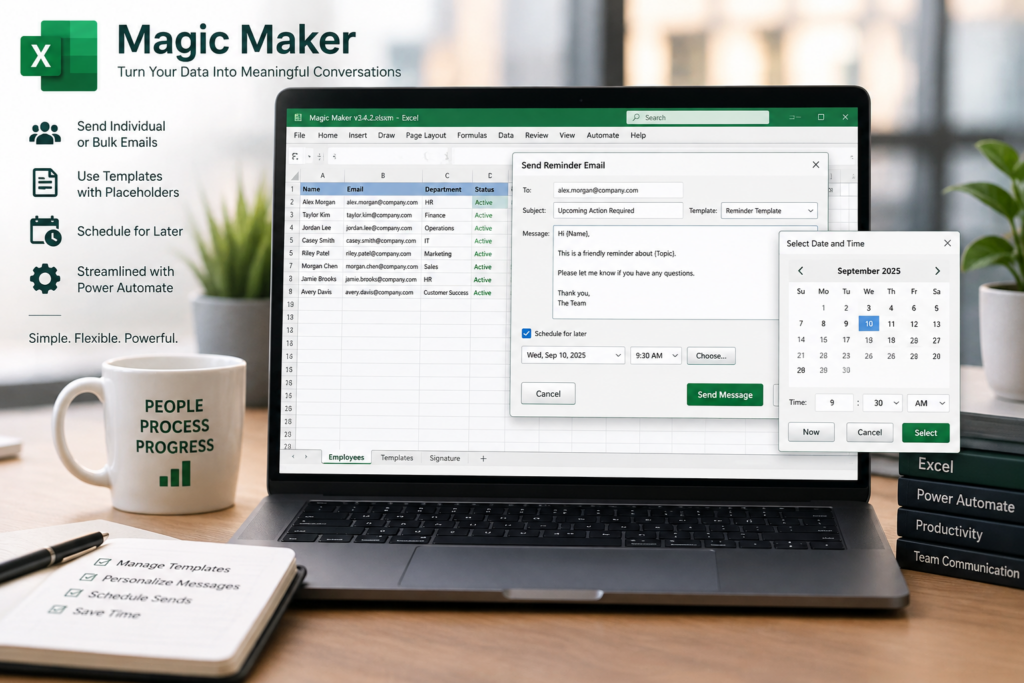
At first glance, Magic Maker looks like an unusually capable Excel mail merge tool.
Underneath, it is really a small communications workflow platform.
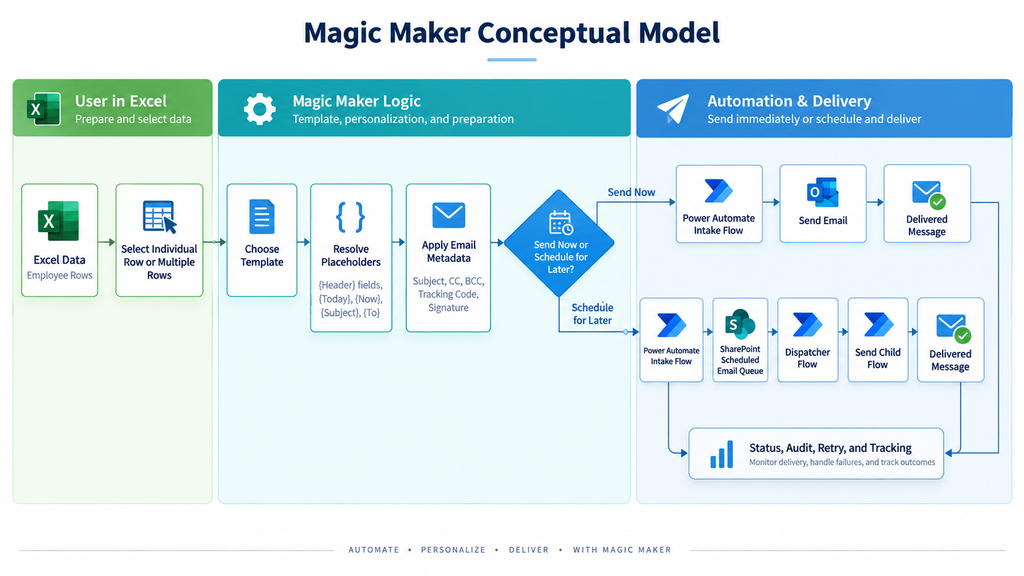
Excel provides the familiar user interface, data structure, configuration, templates, and recipient-level controls. VBA creates the application experience inside the workbook. Power Automate handles the workflow and Microsoft 365 integration. A SharePoint-backed queue provides a durable layer for scheduled messages, status, and downstream processing.
Instead of asking an HR professional to understand APIs, JSON, workflow orchestration, or automation infrastructure, Magic Maker presents the process through a familiar Excel interface.
A user can take an existing report, identify the columns they want to use, write a message using placeholders such as {First Name}, select recipients, and send personalized communications without writing code.
Because field substitution is only the beginning.
| Capability | Outlook/Word Mail Merge | Magic Maker |
|---|---|---|
| Data source | Excel/Outlook/etc. | Excel workbook directly |
| Personalized fields | Yes | Yes, via {Header} placeholders |
| Subject personalization | Limited / awkward | Yes |
| Individual send | Not really the focus | Yes |
| Bulk send | Yes | Yes |
| CC/BCC per recipient | Generally not supported cleanly | Yes |
| Per-row tracking code | No native concept | Yes |
| Reusable templates | Word documents/templates | Built-in Templates sheet |
| Template picker | No | Yes |
| Custom signatures | Outlook/Word dependent | Controlled by workbook |
| Schedule individual email | Not part of classic mail merge | Yes |
| Schedule bulk email | Not part of classic mail merge | Yes |
| Future-send queue | No | Can use SharePoint + Power Automate |
| Power Automate integration | Not intrinsic | Core architecture |
| API/HTTP endpoint support | No | Yes |
| Custom metadata | Very limited | Arbitrary JSON fields |
| Per-recipient workflow logic | Very limited | Yes |
| Audit/history capability | Limited | Can be designed into queue |
| Retry/failure handling | Minimal | Can be explicit |
| Cancel/reschedule queued mail | No | Possible |
| Custom UI | No | VBA UserForms |
| Business-specific logic | Very limited | Fully customizable |
The important distinction is not that Magic Maker can perform a better mail merge.
It is that Excel becomes the front end to an automation platform.
That opens possibilities well beyond email.
Data from each row can become structured metadata. That data can be passed to Power Automate, SharePoint, APIs, document-generation processes, approval workflows, reporting systems, or entirely different communication channels.
And the person using it does not need to know any of that.
They just use Excel.
The Outcome
Magic Maker stopped being a one-off spreadsheet and became reusable HR infrastructure.
The original architecture could be duplicated and adapted for entirely different business processes without rebuilding the underlying system.
We used the same approach to create repeatable tools for:
- communicating with new hires about New Employee Orientation;
- generating and distributing annual compensation communications;
- scheduling managers for management training; and
- sending other personalized organizational communications from existing Excel reports.
Instead of recreating a process every time HR needed to communicate with a group of employees, the team had a reusable tool in its shared directory that could turn structured Excel data into controlled, personalized communication.
That is the part of this project I find most interesting.
I did not build another system HR had to learn. I added capability to a system they already knew.
The project also reflects something I believe strongly about the future of operational leadership: you do not necessarily need to be a software engineer to build useful technology.
You need to understand the business problem deeply enough to know what should exist, understand technology well enough to design how the pieces should interact, and be willing to learn the rest.
AI dramatically accelerated that process for me, but there were still plenty of hours spent debugging VBA, inspecting JSON payloads, tracing Power Automate runs, questioning architectural decisions, and discovering all the creative ways Excel can remind you that it was not originally designed to be an application platform.
And yet...
It works.
More importantly, people can actually use it.
What's Next
Because the architecture extends through Power Automate and APIs, email does not have to be the end state.
Some of the next capabilities I am exploring include:
Personalized PDF generation
Allowing Magic Maker to map Excel columns to named fields inside a PDF, generate a recipient-specific document, and attach the completed PDF to that recipient's message.
Omnichannel communication
Using the same Excel-driven workflow to initiate physical mail, SMS, WhatsApp, or other communication channels through services such as Click2Mail or Twilio.
External data sources
Importing recipient and transaction data directly from APIs rather than requiring every process to begin with a manually generated report.
Richer workflow intelligence
Expanding queue management, delivery history, exception handling, reporting, and downstream actions so a communication can become the beginning of a process rather than simply the end of one.
The larger idea is simple:
Take a tool people already know, connect it to capabilities they normally would not have access to, and hide the complexity behind a workflow that feels ordinary.
That is what Magic Maker became.